The best backtesting software in 2026: nine tools compared
By DT Terminal · Published · Updated · Prices checked 10 September 2026
The right backtesting software depends on what you are testing. For the deepest history, Forex Tester Online has up to 23 years of tick data from $159 a year, and FX Replay replays major forex pairs back to 2003 with a prop firm simulator on Pro. To keep backtests beside live trades, TradeZella does both from $35 a month, and DT Terminal does the same with a free tier, on less history today: its practice sessions feed the same journal Edge reads, so you can practice the one fix Edge found, on the same charts you trade live. For automated strategies, the MetaTrader 5 Strategy Tester is free for Expert Advisors, NinjaTrader suits futures traders on Windows, and QuantConnect runs Python or C# strategies over decades of data. Backtestingmax gives unlimited free sessions on the last 12 months of forex and metals data, and Tradervue is a journal with no backtesting at all.
Nine tools, side by side.
| Tool | Markets | Bar replay | Journal integration | From price |
|---|---|---|---|---|
| FX Replay | Forex, indices, stocks, futures, crypto, commodities | Backtest analytics, no broker link | Free, paid $17.99/mo | |
| Forex Tester | Forex, stocks, indices, commodities, crypto, futures | Backtest analytics; Pro imports MT and NinjaTrader history | $159/yr | |
| TradeZella | Stocks, futures, forex, crypto | Same journal as live trades | $35/mo | |
| Backtestingmax | Forex, metals; more on Premium | Trade log, 5 a month free | Free | |
| DT Terminal | Forex, metals, futures, crypto | Same account as your synced trades | Free, Pro $24/mo | |
| NinjaTrader | Futures, forex | Market Replay, funded account | Strategy reports only | Free |
| MetaTrader 5 Strategy Tester | Forex, CFDs, stocks, futures, per broker | Visual mode, for robots | Test report only | Free |
| QuantConnect | Equities, options, futures, forex, crypto, CFDs | Backtest reports only | Free | |
| Tradervue | Stocks, options, futures, forex | Free |
USD, as listed on each vendor's site on the date above. Annual billing is usually cheaper than the monthly figure.
Grouped by the job, not ranked. Entries 1 to 5 are manual replay tools, 6 to 8 test automated strategies, and 9 is a journal. Each one answers the same five questions.
01FX Replay
- Manual backtesting in the browser: pick a market and a date, replay it and trade it. No coded strategies and no live trading.
- Forex, indices, metals, energy, bonds and crypto, with stocks, CME futures and seconds data on Pro. 1 minute data throughout, back to 2003 on major forex pairs and 2016 on some others, on charts down to 5 seconds.
- Free for 2 sessions of 50 trades, kept for a week. Intermediate is $17.99 a month or $180 a year. Pro, which adds the prop firm simulator, is $35 a month or $350 a year.
- The lower plans cap sessions, trades per session and how long a session is kept, and it cannot test code or Expert Advisors.
- Discretionary forex and index traders who want deep intraday history and prop firm rule practice in a browser.
02Forex Tester
- Manual replay backtesting, plus trading robots on Pro. Forex Tester Online runs in the browser; the older desktop Forex Tester is Windows only.
- Up to 23 years of tick data per symbol, included in the price. Starter has 80 symbols across forex, stocks, indices, ETFs and commodities; Pro has 283 and adds crypto and CME futures.
- Online Starter is $159 a year. Pro is $239 a year or $31.99 a month, and lifetime licences start at $239. The prices are listed as a sale, so check before you buy. A free demo needs no card.
- Prop firm challenges, robots and custom indicators are all Pro only, so Starter is manual replay and little else.
- Forex traders who want the longest tick history and a yearly or one-off price instead of a monthly one.
03TradeZella
- A trading journal first, with candle by candle backtesting, and automated runs from plain English rules on the higher plans. Web.
- Futures, stocks, forex and crypto from a fixed symbol list (its help centre names about 150 stocks, 29 futures and 23 crypto pairs), from 2014, on charts down to 1 second.
- No free plan. Essential is $35 a month, or $26 a month billed annually, and backtests up to 10 strategies by hand. Pro, at $59 a month, adds automated runs and trade replay.
- Symbols come from a fixed list and a missing one is a request to support. History starts in 2014, and automated runs are capped each month.
- Traders who want backtests and broker-synced live trades in one journal and are comfortable paying monthly for it.
04Backtestingmax
- Manual replay backtesting in the browser, with daily and historical challenges on a leaderboard and an AI that drafts strategies from plain English.
- Forex and metals on the free plan, limited to the most recent 12 months. Premium adds crypto, indices, commodities, ETFs, bonds, futures and stocks, and the full history the site puts at 20 years or more.
- Free with unlimited sessions. Premium and lifetime plans are sold, but the pricing page did not show their prices when we checked, so confirm on the site.
- The free plan has no technical indicators, a year of data and five logged trades a month.
- Forex traders who want unlimited free sessions to practice reading recent price action.
05DT Terminal
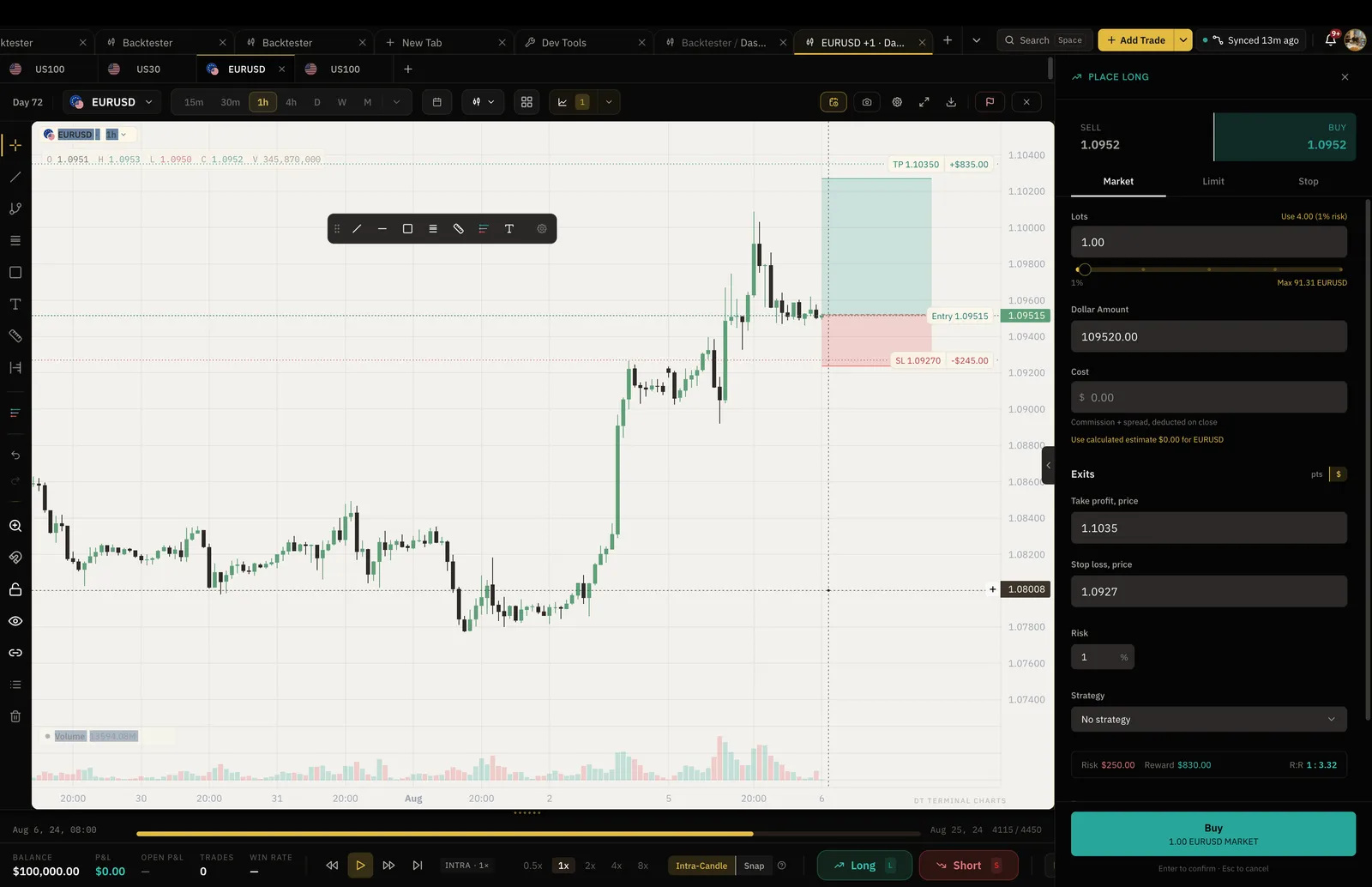
- An AI trading improvement platform with a manual, bar by bar backtester. What sets it apart is where a session goes when it ends. Replay feeds the journal and Edge: every practice trade is logged with its R, the session keeps its own stats next to your live trades, and Edge learns from your practice and your real trading together. That means you can practice the one fix Edge found in your live trades, then check whether it held. And it is the same chart as Live Charts, with the same drawings, indicators and menus, up to four panes on different timeframes and jump to any date, so what you practice looks like what you trade. Web, Windows, macOS and Linux.
- Forex, metals, index CFDs such as US100 and GER40, major coins and CME futures. 1 minute candles on every market, with 1s to 30s charts on Ultra and tick-level fills on Ultra. Seconds history goes back years on 13 markets (EURUSD, XAUUSD, GBPUSD, USDJPY, USDCAD, AUDUSD, USDCHF, US30, US500, GER40, NAS100, BTCUSD and Cotton), and is shorter on the rest for now while more is added. History for the main indices starts in 2014, and futures cover about the last 2 years, with their seconds as 1 second bars (futures have no ticks). No stocks.
- Free for 2 sessions at a time, of up to 50 trades each. Plus is $9 a month for 3 sessions at a time. Pro is $24 a month or $199 a year, with unlimited sessions, trades and indicators, and more markets in one session.
- Historical data is thinner than FX Replay or Forex Tester: seconds history is deep on the main markets and shorter on the rest so far, futures cover about the last 2 years, and there is no prop firm rule simulator or automated strategy testing yet.
- Traders who want their practice to count: to drill the one thing their own trades say to fix, on the charts they trade live, with the results kept beside their journal, and who can accept less history for now.
06NinjaTrader
- A futures trading platform. Strategy Analyzer backtests and optimises automated NinjaScript strategies, and Playback replays recorded market data by hand. Backtesting lives in the Windows desktop app.
- Futures and forex. Market Replay data, level I and level II, is kept for roughly the last 90 days on popular contracts; older tick history comes from your data provider.
- Free for simulation. The $99 a month plan and the $1,499 lifetime licence mainly lower commissions. Market Replay needs a funded account.
- Backtesting is Windows only, and automated strategies are written in C# as NinjaScript.
- Futures traders who trade through NinjaTrader and want to automate a strategy or replay order flow.
NinjaTrader website (referral link: DT Terminal may be paid if you sign up)
07MetaTrader 5 Strategy Tester
- Tests automated Expert Advisors inside MetaTrader 5, with a visual mode to watch the robot trade and optimisation spread across the MQL5 Cloud Network.
- Whatever your broker offers, usually forex, CFDs, stocks and futures. It can test on real ticks recorded by the broker, so how far back you can go depends on the broker.
- Free with MetaTrader 5. Renting cloud agents for optimisation costs about $0.08 an hour per standard agent.
- Built for robots, not people. Placing trades by hand in visual mode needs an Expert Advisor with buy and sell buttons, and strategies are written in MQL5.
- Forex and CFD traders building or buying Expert Advisors with an MT5 broker.
08QuantConnect
- Automated backtesting in Python or C# on the open source LEAN engine, in a web IDE or locally, with live trading through brokers on paid tiers.
- US equities from 1998, US futures from 2009, forex from 2007, equity options from 2012 and crypto from 2015, down to tick resolution on most, included for cloud backtests.
- Free for unlimited backtests on one small node, which waits a few seconds before each run. Paid tiers add nodes and live trading, and compute nodes are billed on top.
- Everything is code. There is no manual replay, so it tests rules rather than your discretion.
- Systematic traders who program and want long, survivorship-bias-free equity and options history.
09Tradervue
- A journal for trades you have already taken: import from your broker, tag them, see each entry and exit on a chart, and report on the results.
- Stocks, options, futures and forex, from your own imported trades. There is no historical market data to test against.
- A free plan with a monthly import cap. Silver is $29.95 a month and Gold $49.95 a month, with a trial on both.
- It is not a backtester. There is no replay and no simulation, so ideas have to be tested somewhere else first.
- Stock and options traders who want to review live trades in depth and do their testing in another tool.
It depends on what you test. For manual replay, Backtestingmax gives unlimited free sessions on the last 12 months of forex and metals. For automated strategies, the MetaTrader 5 Strategy Tester is free with any MT5 broker and QuantConnect has a free tier for coded strategies. FX Replay and DT Terminal each give two free sessions to try.
What happens after the session. Replay feeds the journal and Edge: practice trades are logged with their R and kept beside your live trades, and Edge learns from both. So you can practice the one fix Edge found in your real trades, then see whether it held. It is also the same chart as Live Charts, with the same drawings and indicators, so practice looks like the market you trade. The trade-off today is history: seconds history is deep on the main markets and shorter on the rest so far, and futures cover about the last 2 years.
Manual backtesting replays a chart bar by bar while you decide every entry and exit, so it tests your judgement. Automated backtesting runs written rules over years of data in seconds, so it tests the rules. FX Replay, Forex Tester, TradeZella, Backtestingmax and DT Terminal are built mainly for the first. The MT5 Strategy Tester, NinjaTrader and QuantConnect are built for the second.
Enough to cover the conditions you will trade in: trends, ranges, news days and quiet sessions. For an intraday setup that usually means at least a year of minute data and a hundred or more trades. For a swing strategy it means several years of daily or 4 hour bars. Check the depth for the exact symbol and timeframe you trade, because every tool here varies by market.
Of the nine, FX Replay and Forex Tester Online advertise prop firm challenge simulation, both on their Pro plans. DT Terminal does not have one today, so on DT Terminal you would track a firm's drawdown and daily loss limits yourself.
Only if you compare them honestly. Keep the backtest trades, log live trades with the same setup tags, and compare win rate, average R and drawdown. TradeZella keeps both in one journal, DT Terminal keeps backtest sessions in the same account as your live journal, where Edge reads both, Tradervue analyses the live side only, and Forex Tester Online Pro can import live platform history. With the rest, the comparison is yours to do.