How to prove a prop firm payout is real
By DT Terminal · Published · Prices checked 13 October 2026
A payout screenshot or a firm certificate proves little on its own, because both are images and both are easy to edit. Credible payout proof ties the money to the account it came from. Keep the funded account connected read only, so the trades behind the payout come from the broker's server rather than a keyboard. Keep every document the firm sends: the payout confirmation, the bank or wallet line it landed on, and the certificate for each phase you passed. Then have the payout checked against that account, so the amount has to fit the profit the account actually made. In DT Terminal each payout you submit is screened for plausibility, reconciled against the account's synced trades and reviewed by a person before it shows on your public DT Passport, where a prop account shows verified payouts rather than the firm's P&L. Know the limit too. A checked payout shows one account was paid, not how the accounts before it went.
Four kinds of proof
What payout proof can and cannot show.
| Proof | Who issued it | What it does not prove |
|---|---|---|
| A screenshot of a payout email or dashboard | The trader, captured from the firm's page | That the image was not edited, or that the account behind it made the profit |
| A firm certificate, as an image or PDF | The firm, as a document to share | That the file is genuine, or how many accounts failed before it |
| A bank or crypto wallet receipt | The bank or wallet, shown by the trader | Which firm or which funded account the money came from |
| A payout checked against the synced account it came from | The broker server for the trades, a reviewer for the document | Who holds the account, or how the trader's other accounts went |
The last row is the one worth asking for. It is still one account, so read it beside everything else the trader shows.
The procedure
Eight parts. The first three are what you do before the payout lands, the middle three are how it gets checked and published, and the last two are for reading someone else's claim and knowing where any check stops.
01Why a payout screenshot proves little on its own
A payout post is usually a picture: a dashboard, an email, a certificate with a name and an amount on it. Every one of those can be changed in a few minutes with an image editor, and a careful edit leaves nothing a viewer can spot. Firm certificates are made to be shared, which also makes them easy to copy, so a certificate on its own is weak evidence however official it looks.
Even a genuine payout answers a narrow question. It says one funded account paid out once. It does not say how many evaluations were bought and failed before it, whether the trader is still funded, or whether the profit came from the strategy they are selling. A reader who has been burned before knows this, which is why a picture rarely convinces the people you most want to convince.
Proof that holds up connects the payment to the account it came from, and lets someone other than you check that the account really made the money. The rest of this guide is how to put that in place before you need it.
- A screenshot shows what a screen looked like, not what an account did
- A certificate is a document the firm hands out, so it is easy to copy
- One payout says nothing about the accounts that failed before it
02Keep the funded account connected read only
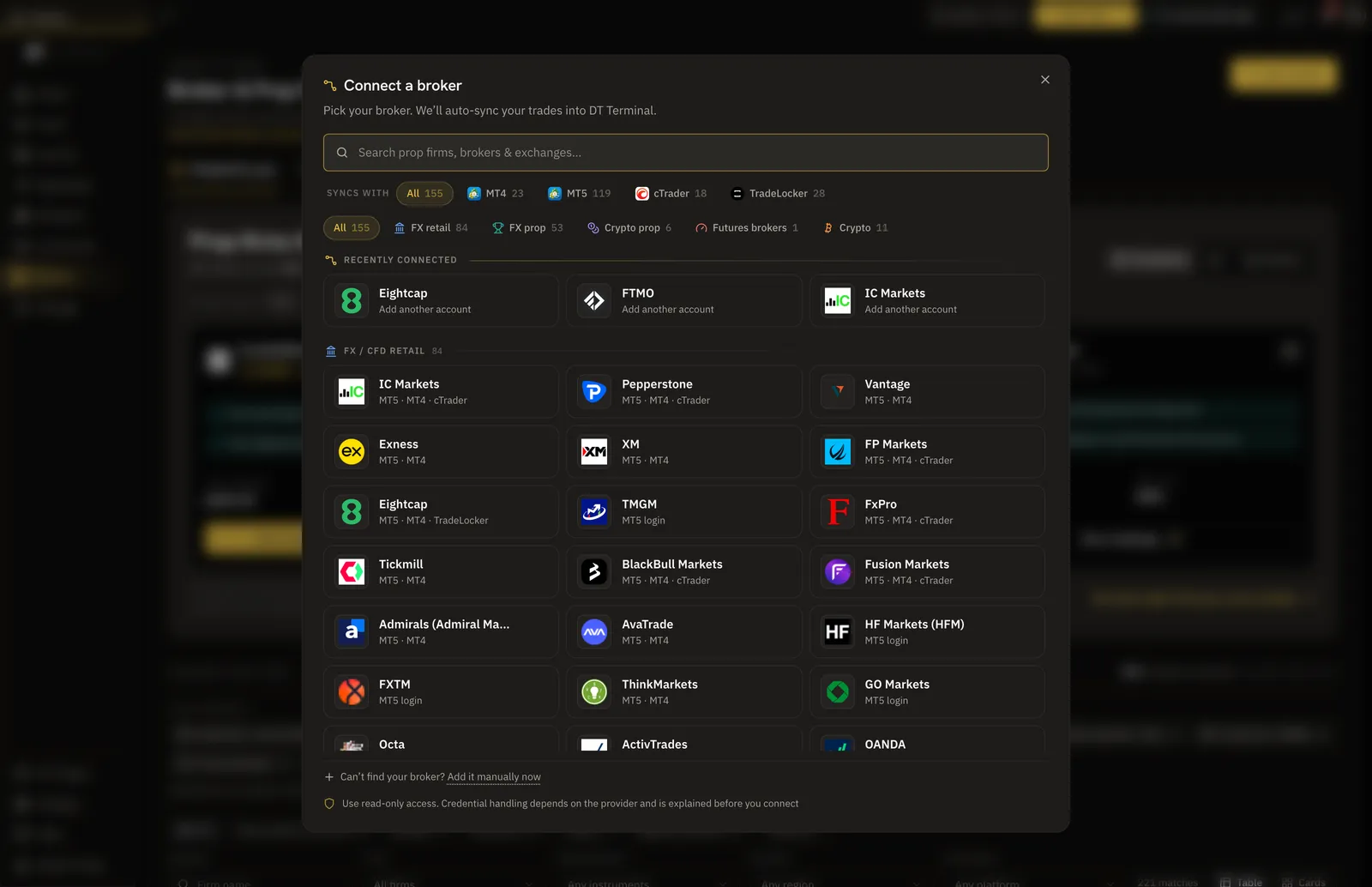
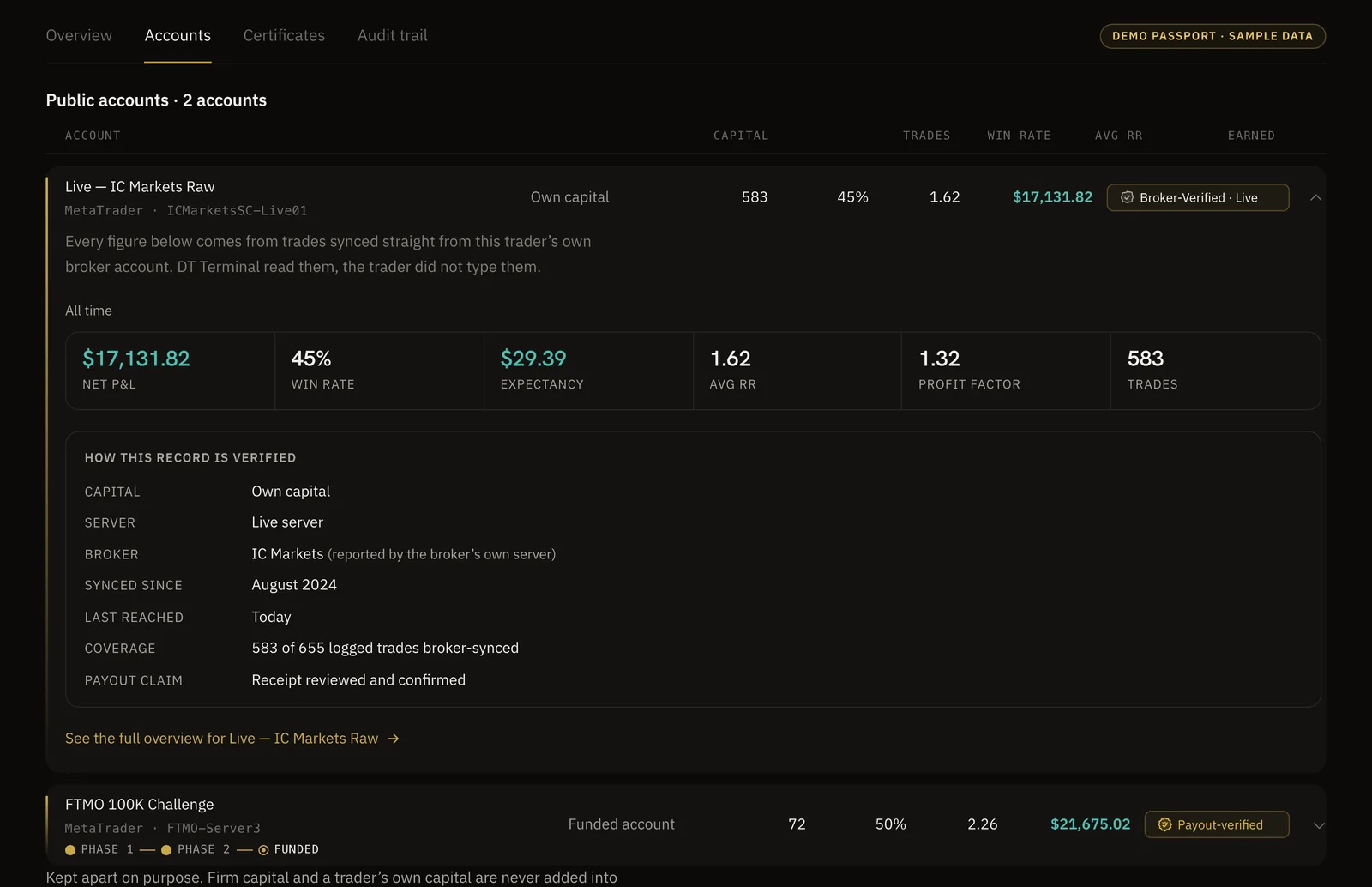
The trades behind a payout are the part a picture cannot fake, so get them on record from the platform itself. In DT Terminal an MT4 or MT5 account connects with a read only investor login, and cTrader, TradeLocker and Tradovate accounts connect too. A prop account that syncs earns a Firm-Verified seal rather than the Broker-Verified one a live personal account gets. Both say the same thing: these numbers came from the platform, not from a keyboard.
Prop challenges run on demo servers by design, so a synced prop account still verifies. A Tradovate account earns the seal only when its trades reconcile with the account's own cash ledger. On a broker-linked account the market facts on each synced trade are locked, and a hand-logged trade cannot be added to it, so the record behind a payout is the platform's record and nobody else's.
Connect early. A payout can only be reconciled against trades that are already on the account, so an account connected the week after the payout has nothing behind it to check.
- MT4 and MT5 connect with a read only investor login
- A synced prop account reads Firm-Verified, a synced live account reads Broker-Verified
- Connect before the payout, so the profit behind it is already on record
03Keep every document, and the challenges behind the payout
Save everything the firm sends, the day it arrives: the payout confirmation, the line on your bank or wallet statement where the money landed, and the certificate for every phase you passed and for the funded account itself. Keep the originals rather than cropped screenshots. If you ever need to show one, you can redact a bank number or your full name, and the amount and the date are what matter.
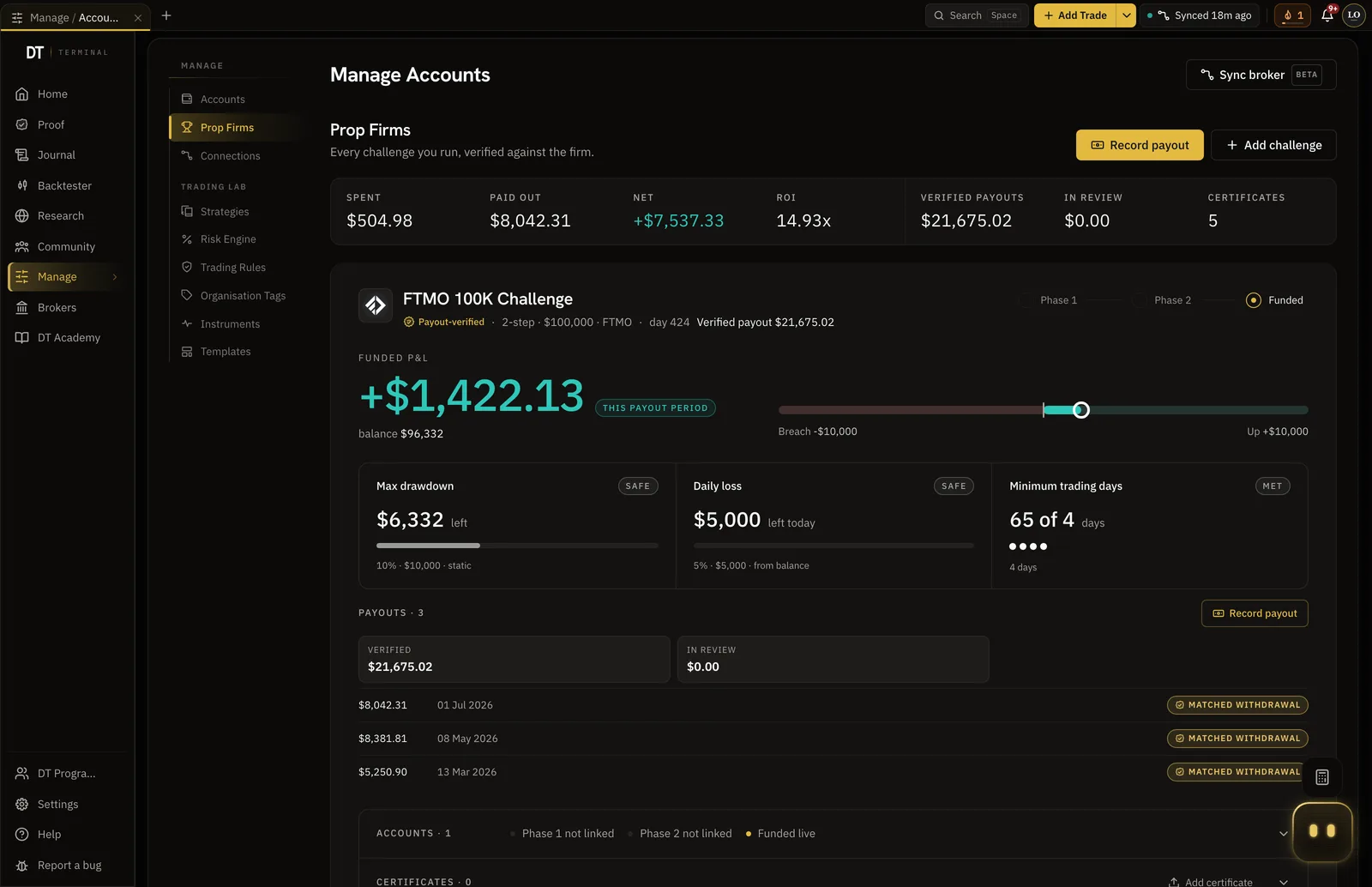
Keep the evaluations on the same record too, including the ones you failed. In DT Terminal prop challenges are tracked phase by phase, so a pass keeps its history instead of overwriting it, and the funded account sits beside the evaluation that earned it. That is what lets a payout be read in context rather than as a lucky one-off.
How often your firm pays, what split it takes and what its certificates look like are the firm's own rules. Read them on your firm's pages, and write the payout cadence and the split into the account, because the review uses them when they are there.
- The firm's payout confirmation and the statement line where the money landed
- A certificate for each phase passed and for the funded account
- Failed evaluations stay on the record, so the payout has its context
04Submit the payout or certificate, and what the review checks
Record a payout from your prop journey on the Verification page or from your DT Passport, and add a certificate from the Certificates tab of your Passport. A payout needs the funded account it came from, the amount and currency exactly as the receipt shows them, the date you were paid, and the receipt itself as an image or PDF. The receipt is stored privately, visible only to you and the reviewer. Until it is confirmed it reads as in review and counts toward nothing.
An automated read screens the document first. It checks that the file is plausibly what you said it is, the right kind of document from the right firm with the same amount and date, and that it shows no obvious signs of editing. That screen can turn away clear junk. It can never confirm a payout on its own.
Then the claim is reconciled against the account's synced trades. The account should be marked funded and have trades on it before the payout date. The realised profit since the last verified payout, at the split recorded on the account, has to cover the amount claimed, and the same amount should not already be verified on that account within a week. If the profit the account made is smaller than the payout, the claim is refused and you are told which figure did not fit. Any other mismatch goes to a person with the figures attached, because a stale account setting is a likelier explanation than a forgery.
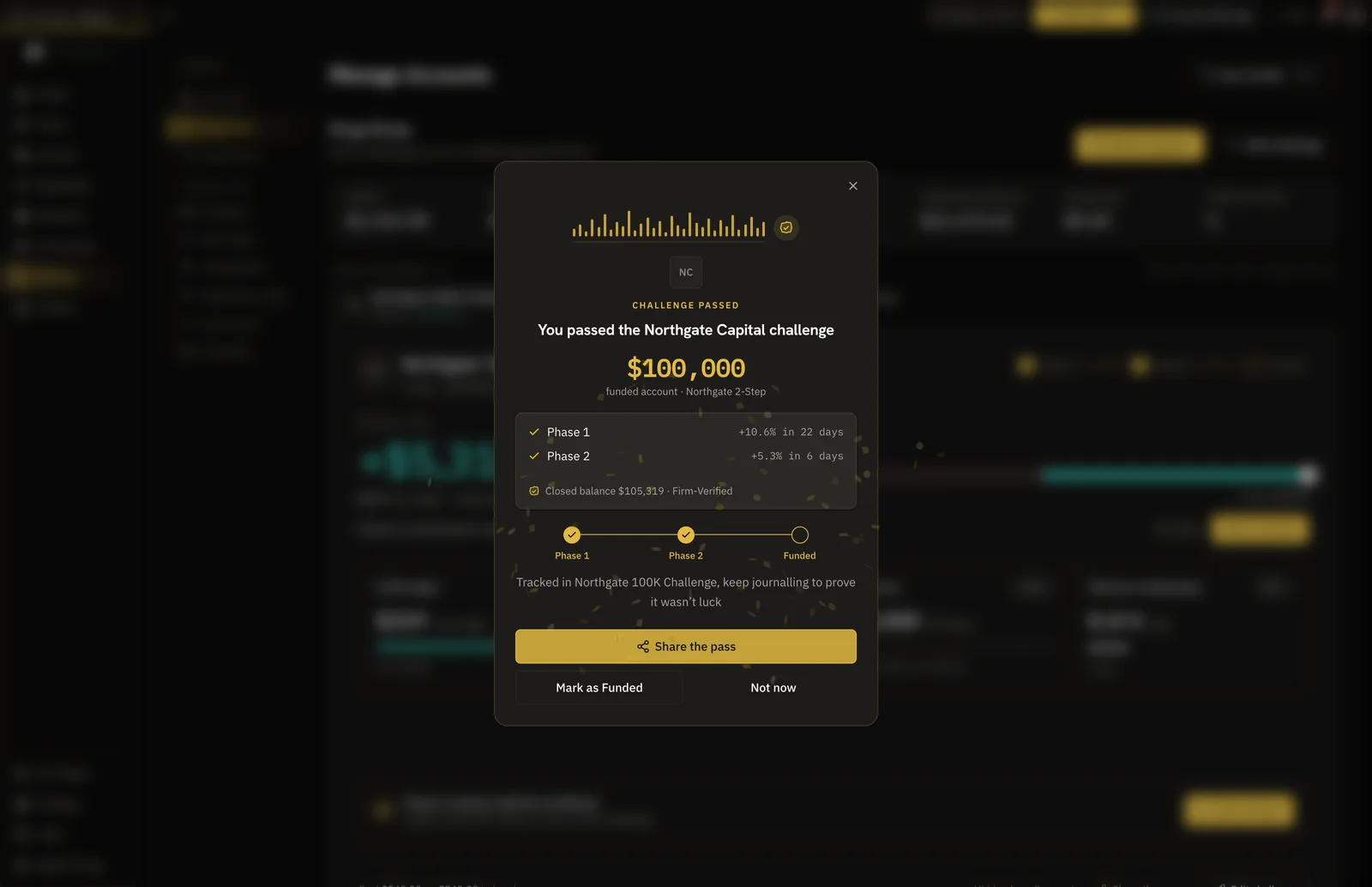
A person then reviews every payout you submit and every funded account certificate before it counts, with the automated read and the ledger figures beside your statement. A phase or challenge pass certificate is checked against the account's profit target on the date it was issued. It can be confirmed without waiting for a person, but only when the account is synced, belongs to the same firm as the certificate, and its broker-synced trades alone show the account closed above a realistic target by that date. Anything short of that waits for a person too.
- Payouts and funded account certificates always wait for a person
- A payout larger than the account's profit is refused, with the figure shown
- A rejected claim can be resubmitted, for example with a clearer receipt
What the review does not do
DT Terminal does not look the payout up in the firm's own systems, and a Firm-Verified seal means the firm was read from the broker's server, not that the firm itself signed off. The review checks that the document is plausible, that the account's own trades support it, and a person's judgement on top. That is a strong combination, and it is not the same as the firm confirming it to you.
05What shows on your public DT Passport
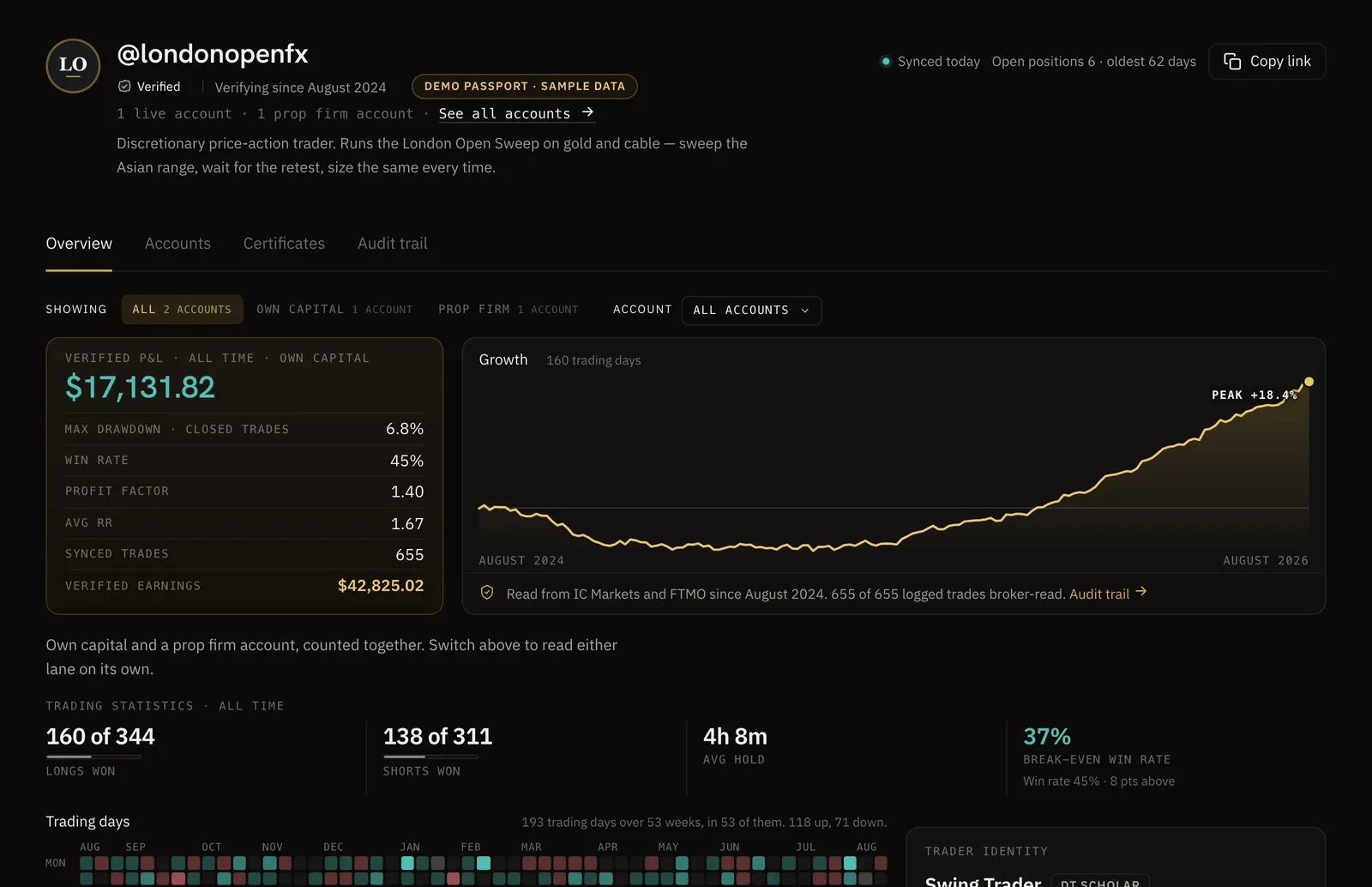
Your DT Passport lives at thedtterminal.com/dtpassport/ followed by the handle you claim. It is public by default once claimed, and you can make it private at any time. It only shows broker-verified records, and backtest and practice accounts never appear on it.
Records are split into two lanes, your own capital and prop firm accounts. A prop account shows the payouts that were verified, never the firm's P&L, because a funded account's P&L is the firm's money and the payout is what was actually yours. Each public account carries its own seal, and the Passport shows how long each connection has synced continuously, as reported by the broker's server.
You choose which accounts are public. That is fair to you, and worth remembering when you read someone else's, because a reader is not told how many accounts the owner kept private.
- Own capital and prop firm accounts sit in separate lanes
- A prop account shows verified payouts, never the firm's P&L
- Public by default once claimed, and it can be made private
06Certificates and the payout ledger
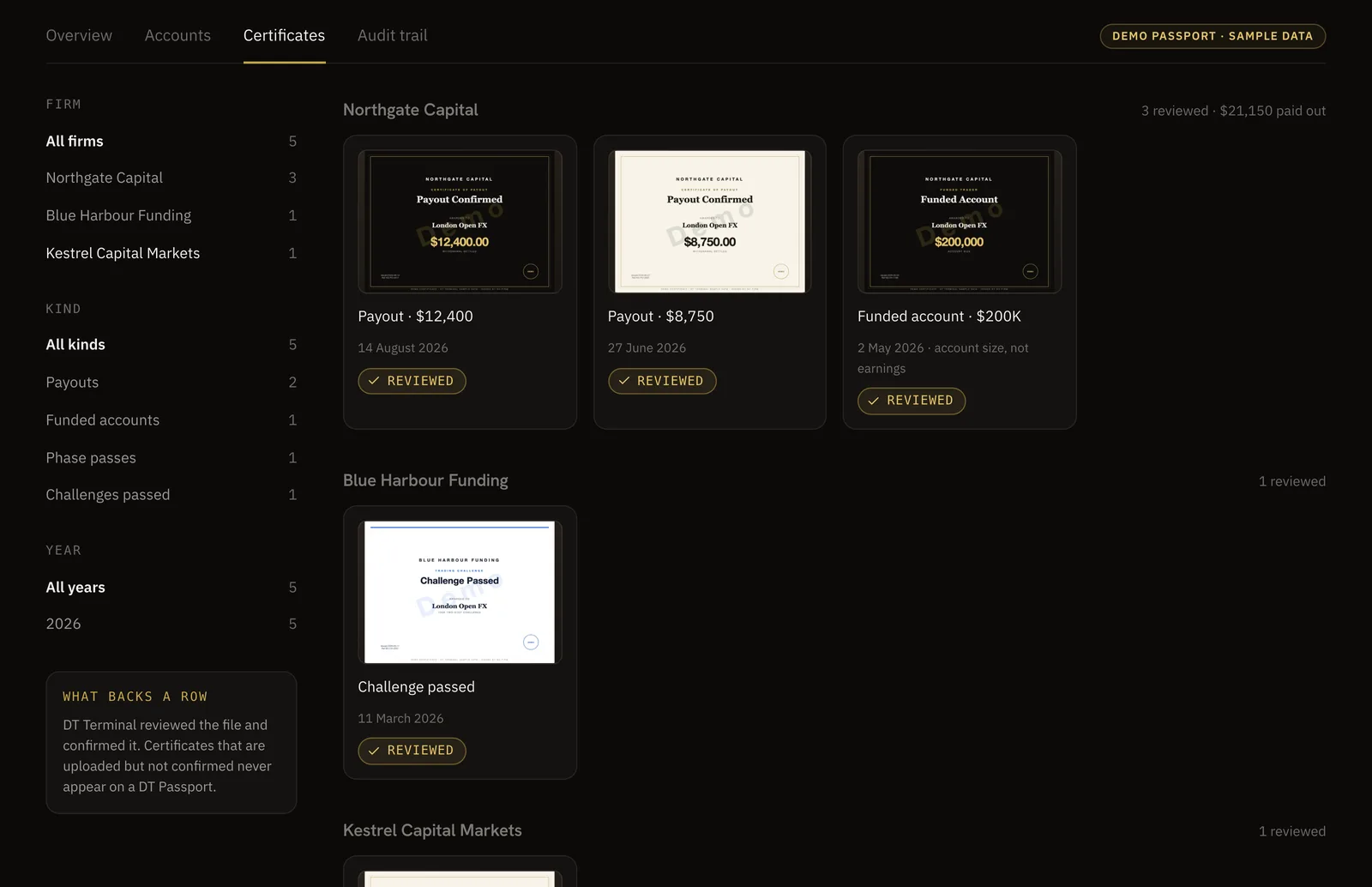
Confirmed certificates appear on the Passport's Certificates tab, grouped by firm, each marked Reviewed. Payout, funded account and challenge pass certificates sit together, so a reader can see the path from evaluation to payout at one firm rather than a single trophy.
Your verified payouts add up to an earnings figure on the Passport. The dated list behind it is a wider disclosure, so it is off until you switch it on for an account. With it on, each verified payout is listed with its date, its firm and how it was verified. Turn it on when you want people to check the detail rather than the total, and leave it off if the dates are more than you want to share.
- Certificates are grouped by firm and marked Reviewed
- The payout ledger is per account, and off until you switch it on
- Each ledger row names the date, the firm and how it was verified
07How to read someone else's payout claim
When a trader, a signal seller or a course posts a payout, ask what sits behind the picture. A fair claim survives these questions, and a trader with nothing to hide will usually answer them without being asked.
Start with the account. Is there a record behind the payout, read from the platform, or only an image? Does the payout fit the profit that account made? How long has the account been connected, and does the record start before the payout or only after it? Then widen the view. How many evaluations sit beside this one, and how did they go? Is this the account the strategy being sold was traded on?
If the answer to most of these is a certificate and a promise, treat the payout as unproven rather than fake. Plenty of real payouts are posted badly. The point is that you cannot tell the real ones from the edited ones by looking, so the account is the thing to look at.
- Is there an account behind it, read from the platform, or only a picture?
- Does the payout fit the profit that account made before it?
- How long has the account been connected, and what sits beside it?
08What verification does not cover
A verified payout shows that a document was screened, that the account's own synced trades support it, and that a person reviewed it. It does not show who is publishing it. DT Terminal does not check that the person publishing a record is the account holder, and anyone with an account's investor login can connect it.
It does not show the accounts a trader keeps private, and a reader is not told that any are hidden. After disconnecting an account, its owner can remove that account's synced history. Some platforms carry their own gaps too: TradeLocker P&L is calculated before fees, and futures accounts verify through Tradovate.
Payout verification is also new. Only a small number of verified payouts and certificates exist on DT Terminal so far, so its absence from a trader's profile is not evidence against them. Treat a verified payout as one strong piece of evidence and read it beside everything else.
- No check that the publisher is the account holder
- Private accounts stay private, and readers are not told they exist
- One verified payout is one account, not a whole career
FAQ
Tie the payout to the account it came from. Keep the funded account connected read only so its trades come from the platform, keep the firm's payout confirmation and the statement line where the money landed, and have the payout checked against the account's own trades. In DT Terminal a payout you submit is screened for plausibility, reconciled against the synced trades and reviewed by a person before it appears on your public DT Passport.
Yes. A certificate is an image or a PDF, and anyone with an image editor can change the name, the amount or the date, often without a visible trace. That is why a certificate on its own is weak evidence. The test that holds is whether the account behind it made the money. Your firm may also offer its own way to check a certificate, so look on the firm's own pages.
No. DT Terminal does not look the payout up in the firm's own systems. It screens the document for plausibility, reconciles it against the account's broker-synced trades, and a person reviews it before it counts. A payout larger than the profit the account made is refused, and any other mismatch goes to a person with the figures attached.
It means the account is synced and the firm was read from the broker's own server rather than typed in by the trader. It does not mean the firm itself signed off on the record. A synced personal live account earns Broker-Verified instead. Both mean the trades came from the platform rather than a keyboard.
Because a funded account's P&L is the firm's money, and what the trader actually received is the payout. On a DT Passport the prop firm lane shows verified payouts, never the firm's P&L, and your own capital sits in a separate lane with its verified P&L.
Yes. Prop challenges run on demo servers by design, so a blunt rule against demo accounts would exclude every funded trader. A synced prop account earns the Firm-Verified seal, because what matters is that the account is connected and the firm is recognised rather than declared.
No. It proves one funded account was paid and that its trades support the amount. The trader chooses which accounts are public, a reader is not told about the private ones, and evaluations that failed before the payout may not be shown. Read a verified payout beside the rest of the record, not instead of it.
Yes. Your DT Passport can be made private at any time. The dated list of each payout is off until you switch it on for an account, and the receipt you upload is stored privately, visible only to you and the reviewer. You can redact your bank number before uploading, because the amount and the date are what get checked.