How to check if a trader's results are real
By DT Terminal · Published · Prices checked 5 October 2026
To check whether a trader's results are real, set the screenshot aside and ask who read the numbers from the broker. A P&L image, a spreadsheet or a statement the trader sends you has passed through the trader's hands, so it can show the best month of the best account. Ask instead for a link to a record that a site reads straight from the broker through a read only login, then check five things on it: whether the account is live, demo or a prop evaluation; how long it has been connected and when the public record starts; how many accounts the trader runs and how many you can see; the drawdown, the trade count and how deposits are treated; and whether any payout claim rests on a document checked against the trades. Remember that most of these sites confirm the account rather than the person, DT Terminal included.
Five kinds of proof
What each kind of proof can hide.
| Proof | Who produced the numbers | What it can leave out |
|---|---|---|
| Screenshot or P&L post | The trader, from a screen and a day they chose | Every other day and account, the deposit behind the figure, and whether the money was real |
| Spreadsheet or typed journal | The trader, by hand | Anything they did not type, and any link between a row and a real fill |
| Broker statement file sent by the trader | The broker, then passed on by the trader | Every account they chose not to send, and anything changed in the file on the way |
| Read only connection to a tracking site | The broker's server, read by the site | On some sites, trades before a chosen start date, excluded instruments or a hidden trade list, and usually who owns the account |
| Prop payout checked against the firm's document | The firm, checked against the account's synced trades | The challenges paid for and failed along the way, unless those accounts are on the record too |
Tracking site rules were read on each vendor's own pages on the date above, and they differ from site to site. Check the one the trader uses.
The checks
Seven checks, in the order to run them. The first one settles most claims in a minute, and the last tells you where to look.
01Ask where the numbers came from
Every trading result was produced by someone. A screenshot was produced by the trader, from a screen they picked, on a day they picked. A spreadsheet or a typed journal is the trader's own account of what happened. Neither is a lie by default, but neither is evidence, because nothing ties the figure to a real fill at a real broker.
The question that sorts most claims is simple: who read these numbers from the broker? On a tracking site the answer should be the site itself, reading the account through a login the trader handed over, usually the read only investor password on MT4 and MT5. Myfxbook checks the history against the broker using the account number, the investor password, the broker and the server. MQL5 Signals registers the same details, and its own server requests the full account history. FX Blue refuses manual and Excel uploads altogether.
A statement file the trader exports and sends you sits in between. The broker produced it, but it passed through the trader's hands, and you are looking at the account they chose to send.
- A screenshot or a spreadsheet shows what the trader wants to show, not what the broker recorded
- Ask for a link to a record a site reads from the broker, not a file or an image
- If the only proof is the trader's word, nobody else has checked the record
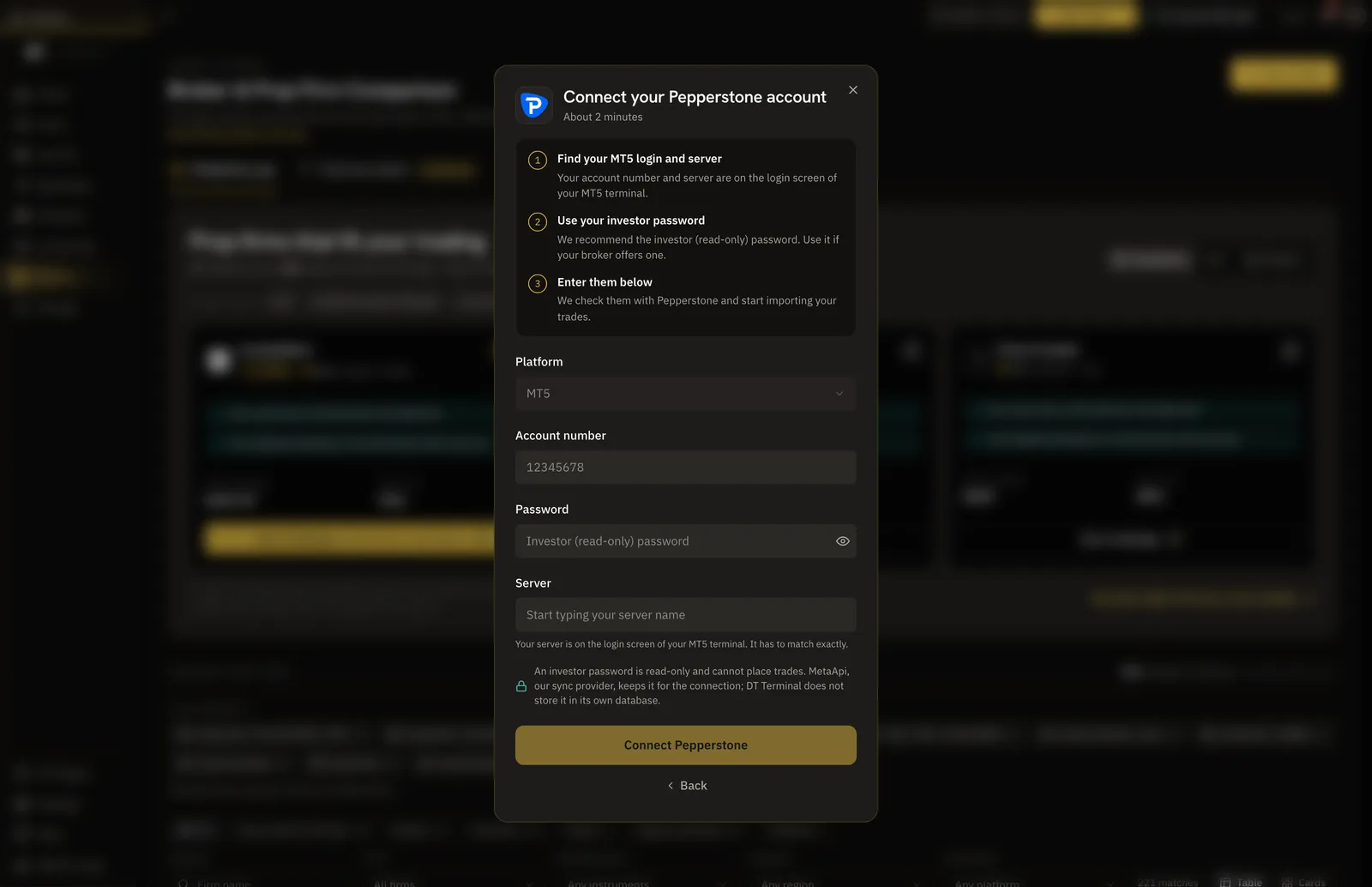
How DT Terminal answers it
A trade earns the verified seal when DT Terminal pulled it straight from the broker: MT4 and MT5 through the investor login, cTrader through view only authorisation, TradeLocker, Tradovate once its trades reconcile with the account's own cash ledger, and listed crypto exchanges through an API key. Manual and CSV trades never carry the seal. TradeLocker P&L is calculated before fees, because its platform reports no commission or swap.
02Check whether the account is live, demo or a prop evaluation
Next, find out what kind of account it is. A live account at a retail broker is real money. A demo account at the same broker is practice, and demo results are cheap to produce in quantity: open ten, keep the one that worked. MQL5 Signals shows on each public signal page whether the account is real or demo, along with its broker server, which is the kind of label to look for.
Prop firm accounts are the case that catches people out. Prop challenges run on demo servers by design, so a blunt rule against demo accounts would throw out every funded trader. For a prop record the question is whether the account is connected and the firm is recognised from the broker server rather than typed in. Then pin down the claim itself, because passing a challenge, holding a funded account and being paid by the firm are three different things.
DT Terminal draws the line the same way. A demo account at a retail broker is not counted as verified. A synced prop account carries a Firm-Verified seal and a synced live personal account carries Broker-Verified. Firm-Verified means the firm was read from the broker server the account connects to, not that the firm itself signed off on the record.
- Live at a retail broker: real money, and the strongest case for a P&L figure
- Demo at a retail broker: practice, whatever the screenshot says
- Prop evaluation or funded account: demo servers by design, so judge the connection and the firm
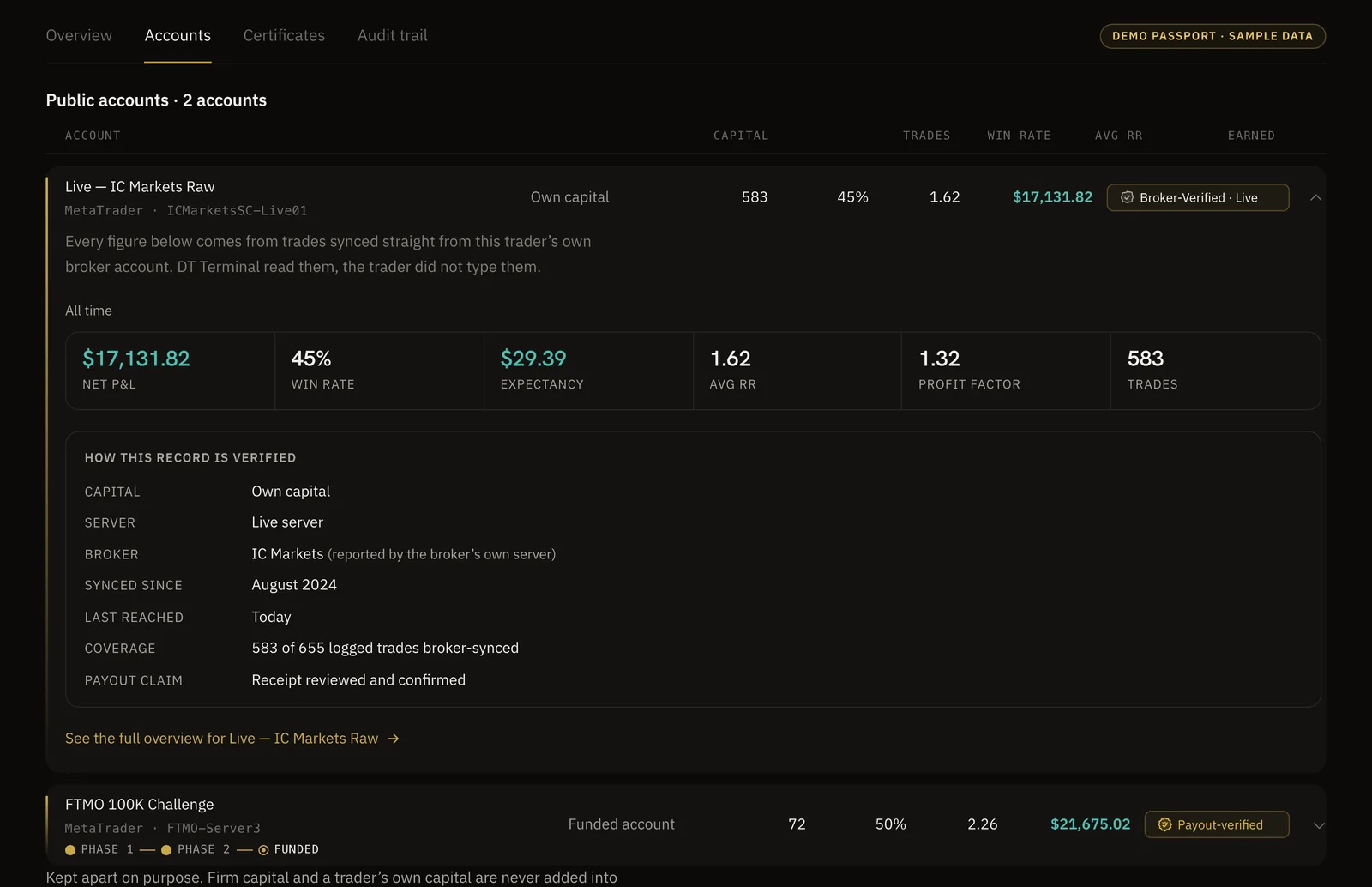
03Look for the whole record, not the best month
One great month proves very little. A trader who runs several accounts can show the one that worked, and a trader with a long history can start the public record after the bad part. Before you read a single number, find out how many accounts there are, when the record starts, and how long the account has been connected.
Tracking sites differ here, so read their rules rather than assume. FX Blue publisher apps let the owner set a start date before which nothing is published, and exclude instruments or magic numbers. Owners there can also hide the trade list, or switch the published account, which overwrites the old data. Myfxbook lets owners hide chosen information, and a custom start date adds a disclaimer to the public page, so look for that disclaimer. Kinfo shows several accounts combined as one portfolio and does not show account size.
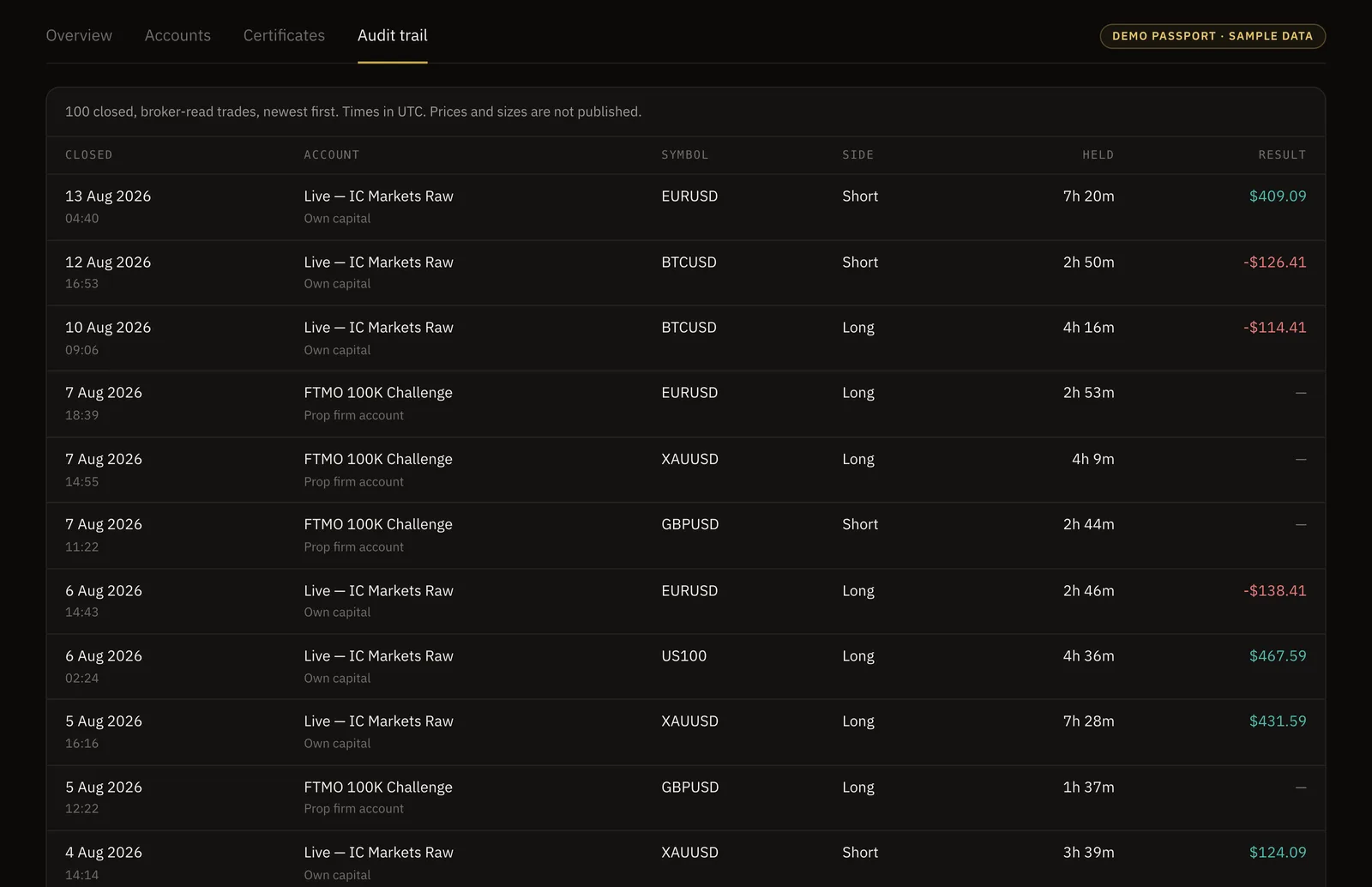
A DT Passport shows how long each connection has synced continuously, as reported by the broker's own server, and lists each public account with its seal. Its limit is worth knowing: the trader chooses which accounts are public, and a visitor is not told when an account has been kept private. The per trade audit trail is also something the trader switches on, and it can be delayed or hide prices and sizes. So ask the trader how many accounts they run, and compare the answer with what you can see.
- How many accounts does the trader run, and how many can you see?
- When does the public record start, and is there a disclaimer about a chosen start date?
- How long has the account been connected without a gap?
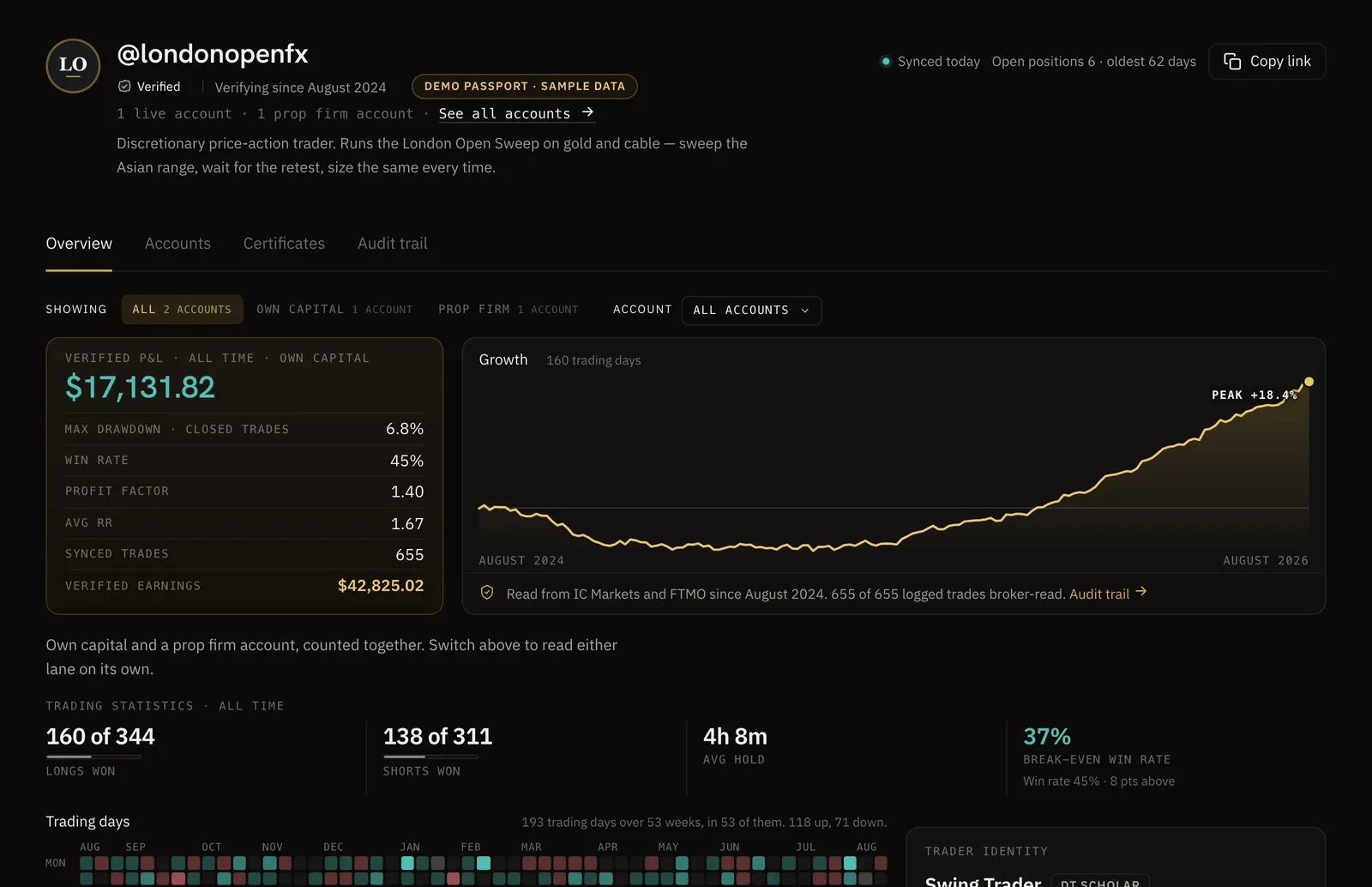
04Read drawdown, trade count and deposits before the return
A return on its own tells you very little. Read the maximum drawdown, the number of trades and the length of the record first, then the return. A large gain from a handful of trades in one month is a different thing from a smaller gain over hundreds of trades and a year of connection, and the drawdown shows what it cost to get there.
Then check how deposits and withdrawals are treated, because a deposit can look like profit on a balance chart. Myfxbook's gain is time weighted, so deposits and withdrawals do not move it, and it shows absolute gain separately. FX Blue chains percentage returns per period for the same reason, and MQL5 Signals calculates growth from the trading history with deposits and withdrawals shown on their own.
On a DT Passport, deposits and withdrawals are kept out of the P&L curve and shown on their own line, and for MT4 and MT5 accounts the headline percent is time weighted, so a deposit cannot move it. For cTrader and crypto accounts the percent is a simple return on the account size, which the trader may have typed, with a notice that cash flows are not available for that broker. Win rate, drawdown and trade count publish whichever way the trader chooses to show P&L.
- Drawdown and trade count first, return last
- A percent should be time weighted, or a deposit can pass for profit
- A short record with a huge return deserves the closest look
05Treat a payout claim as a document, not a screenshot
Payout screenshots are everywhere in prop firm marketing, and an image of a web page or an email is easy to edit. A payout is credible when there is a document from the firm and the trades on that account could have produced it.
So treat a payout claim as a document to check, not a picture to admire. Ask which firm paid, into which account and on what date, then look at whether that account is connected and whether its trades support the amount. If the trader cannot say which firm paid them, the claim cannot be checked.
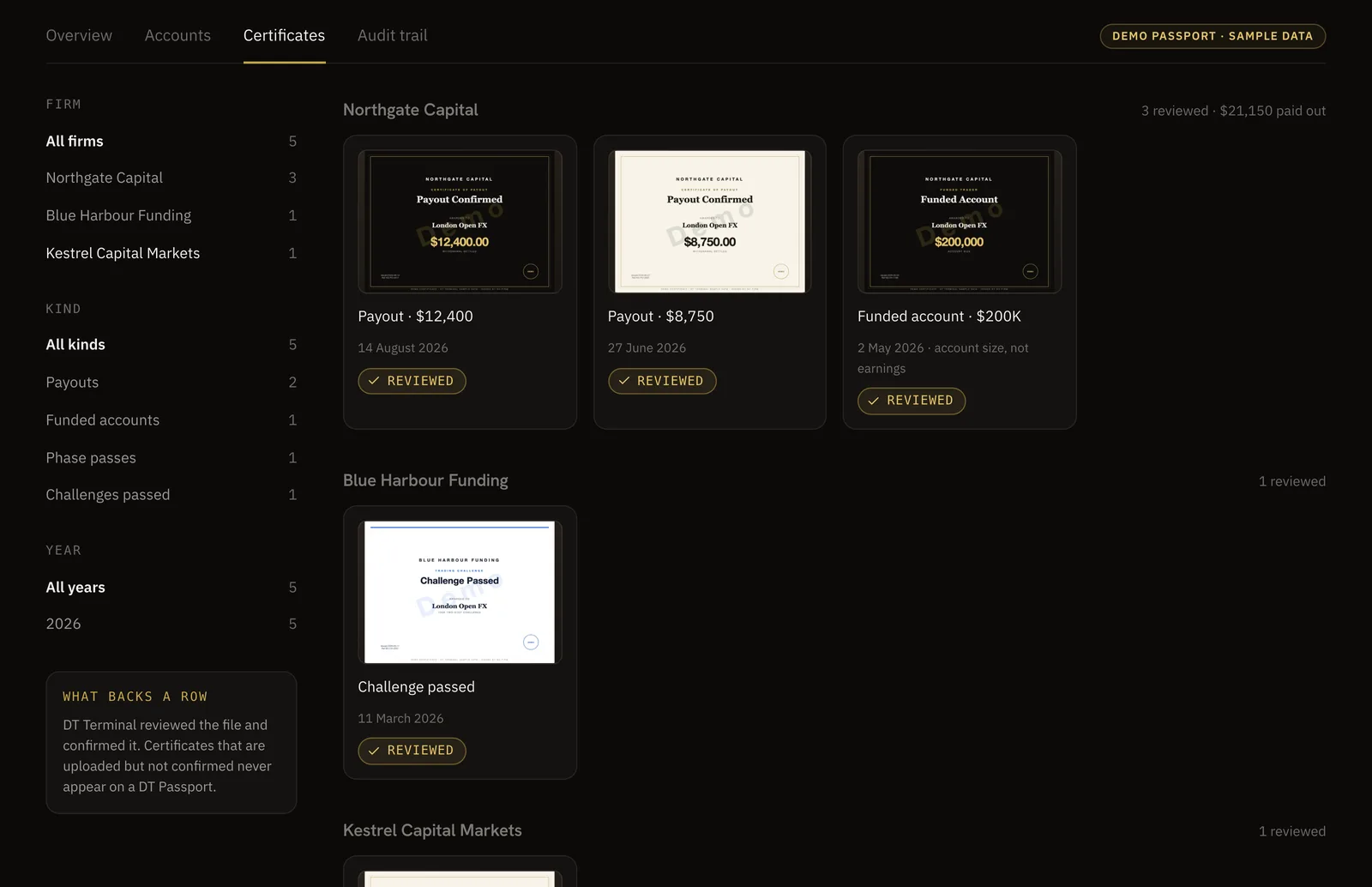
In DT Terminal, traders submit payouts and firm certificates, each one is screened for plausibility and reconciled against the account's broker synced trades, and payouts and funded certificates are reviewed by a person before they appear. A challenge pass certificate can be confirmed without a person when the account's synced trades back it up. DT Terminal does not check the document with the firm itself, and on the public Passport a prop account shows its verified payouts rather than the firm's P&L.
- Which firm paid, into which account, on what date
- Is the account that earned it connected, and do its trades support the amount?
- Passing a challenge and being paid are separate claims
06Know what verification does not prove
A verified record proves that a set of trades came from a real broker account. It does not prove who placed them. Anyone holding an account's investor password can connect it, so a record shown by one person may belong to someone else.
Some sites go further on this. Myfxbook's Trading Privileges check asks the user to prove they hold the master password, by changing the investor password to a generated code or by placing a pending order with the code in its comment, and it is documented for MT4 and MT5. MQL5 Signals checks identity documents for sellers of paid signals, but it does not confirm the publisher controls the account beyond knowing the investor password. Collective2 offers an optional certification that a manager trades the strategy in a live account.
DT Terminal does not run an ownership check like Myfxbook's. It confirms the trades came from the broker account that was connected, but it does not run KYC or check that the person publishing is the account holder. It also recommends the investor password without enforcing it. Read a Passport as proof of the account, and judge the person on everything else you know about them.
- Verified means the trades came from the broker, not that the person showing them placed them
- Ask how the site checks ownership, if it checks at all
- Past results, verified or not, promise nothing about future ones
What a record never tells you
A verified record says nothing about the course or the signals being sold. A trader can be profitable and still sell a method that does not suit your hours, your capital or your temperament, and a good year is not a guarantee of the next one.
07Look the trader up
Once you know what to look for, ask the trader for a link to their record on whatever site they use, and read it against the checks above. A trader with a connected record can usually share a link in seconds. If all you are offered is images, the record has not been checked by anyone but them.
On DT Terminal, a public DT Passport lives at thedtterminal.com/dtpassport/ followed by the trader's handle, and the verification page lets you look a trader up. A Passport is public by default once claimed and can be made private at any time. It shows broker verified records and nothing else, so backtest and practice accounts never appear on it, and its tabs cover the overview, the accounts, the certificates and, when the trader switches it on, the audit trail.
On Myfxbook, ask whether the Trading Privileges check was done, and look for a start date disclaimer. On FX Blue, ask whether anything was excluded before publishing. On MQL5 Signals, read whether the account is real or demo. On Darwinex Zero, remember that a DARWIN is a risk normalised index built on an account Darwinex Zero issues, not the raw curve of an outside broker account.
- Ask for a link, not a file
- Read the record against the checks above, in order
- Ask the questions the page cannot answer, like how many accounts they run
FAQ
Ask for a link to a record that a tracking site reads from the broker, not a screenshot or a spreadsheet. Then check whether the account is live, demo or a prop evaluation, how long it has been connected, how many accounts the trader runs and how many you can see, the drawdown and trade count, and whether deposits are kept out of the return. A real record survives all of that. A record that only exists as images has not been checked by anyone but the trader.
An image of a trading screen is easy to edit, and even an honest one shows only what the trader chose to capture: one account, one day, with no sign of the deposit behind it or whether the money was real. That does not make every screenshot false. It means a screenshot is a claim, and the proof is a record a third party reads from the broker.
A record that a site reads straight from the broker through a login the trader handed over, usually the read only investor password on MT4 and MT5, so the trader does not type the trades in. Myfxbook checks the history against the broker, MQL5 Signals reads it on its own server, and FX Blue refuses manual and Excel uploads. On DT Terminal, manual and CSV trades never carry the verified seal.
Not on its own. Anyone holding an account's investor password can connect it. Myfxbook's Trading Privileges check, documented for MT4 and MT5, asks the user to prove they hold the master password. DT Terminal does not check that the person publishing is the account holder, so read a DT Passport as proof of the account rather than of the person.
Not automatically, but a demo at a retail broker is practice, not money, and demo results are cheap to produce in quantity. Prop firm challenges are different: they run on demo servers by design, so a prop record is judged on whether the account is connected and the firm is recognised. DT Terminal does not count a demo account at a retail broker as verified, and gives synced prop accounts a Firm-Verified seal.
Ask which firm paid, into which account and on what date, then check whether that account is connected and whether its trades could have produced the amount. A screenshot of a payout email is not enough. On DT Terminal, payouts are screened, reconciled against the account's synced trades and reviewed by a person before they appear, and a prop account shows its verified payouts rather than the firm's P&L.
Use the verification page, or open thedtterminal.com/dtpassport/ followed by the trader's handle. A DT Passport is public by default once claimed, shows broker verified records and nothing else, and lists how long each connection has synced continuously. If the trader has kept an account private, the page does not say so, so ask them how many accounts they run.